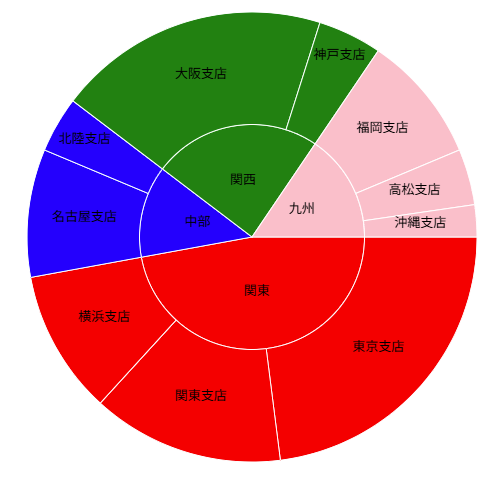
IgcDoughnutchartでは複数のリングを定義することができます。それぞれにバインドするデータを調整し、階層をもつ多層円(サンバーストチャート)を表現することが可能です。
以下のような2階層をもつデータを用意します。
const doughnutData = {
    "regions": [
        {
            "RegionName": "関東",
            "Value1": 410,
            "Children": [
                { "BranchName": "東京支店", "Value1": 200 },
                { "BranchName": "関東支店", "Value1": 120 },
                { "BranchName": "横浜支店", "Value1": 90 }
            ]
        },
        {
            "RegionName": "中部",
            "Value1": 115,
            "Children": [
                { "BranchName": "名古屋支店", "Value1": 80 },
                { "BranchName": "北陸支店", "Value1": 35 }
            ]
        },
        {
            "RegionName": "関西",
            "Value1": 210,
            "Children": [
                { "BranchName": "大阪支店", "Value1": 170 },
                { "BranchName": "神戸支店", "Value1": 40 }
            ]
        },
        {
            "RegionName": "九州",
            "Value1": 135,
            "Children": [
                { "BranchName": "福岡支店", "Value1": 80 },
                { "BranchName": "高松支店", "Value1": 35 },
                { "BranchName": "沖縄支店", "Value1": 20 }
            ]
        }
    ]
}
igc-doughnut-chart には Region と Branch の2つの igc-ring-series を定義します。
<igc-doughnut-chart id="doughnutChart" width="800px" height="500px" inner-extent="0">
	<igc-ring-series name="regionSeries"
			id="regionSeries"
			label-member-path="RegionName"
			labels-position="BestFit"
			value-member-path="Value1"
			others-category-threshold="0">
	</igc-ring-series>
	<igc-ring-series name="branchSeries"
			id="branchSeries"
			label-member-path="BranchName"
			labels-position="BestFit"
			value-member-path="Value1"
			others-category-threshold="0">
	</igc-ring-series>
</igc-doughnut-chart>
メインのデータからそれぞれの igc-ring-series にバインドするデータを取り出します。
//Region のデータ
const regionData = doughnutData.regions.map(region => ({
    RegionName: region.RegionName,
    Value1: region.Value1
}));

//Branch のデータ
const branchData = doughnutData.regions.flatMap(region => region.Children);
各 igc-ring-series にデータと背景色の配列を割り当てます。
//Regionのリング(内側)
const regionSeries = document.getElementById('regionSeries') as IgcRingSeriesComponent;
regionSeries.dataSource = regionData;
regionSeries.brushes = ['red', 'blue', 'green', 'pink'];

//Branchのリング(外側)
const branchSeries = document.getElementById('branchSeries') as IgcRingSeriesComponent;
branchSeries.dataSource = branchData;
branchSeries.brushes = ["red", "red", "red", "blue", "blue", "green", "green", "pink", "pink", "pink"];