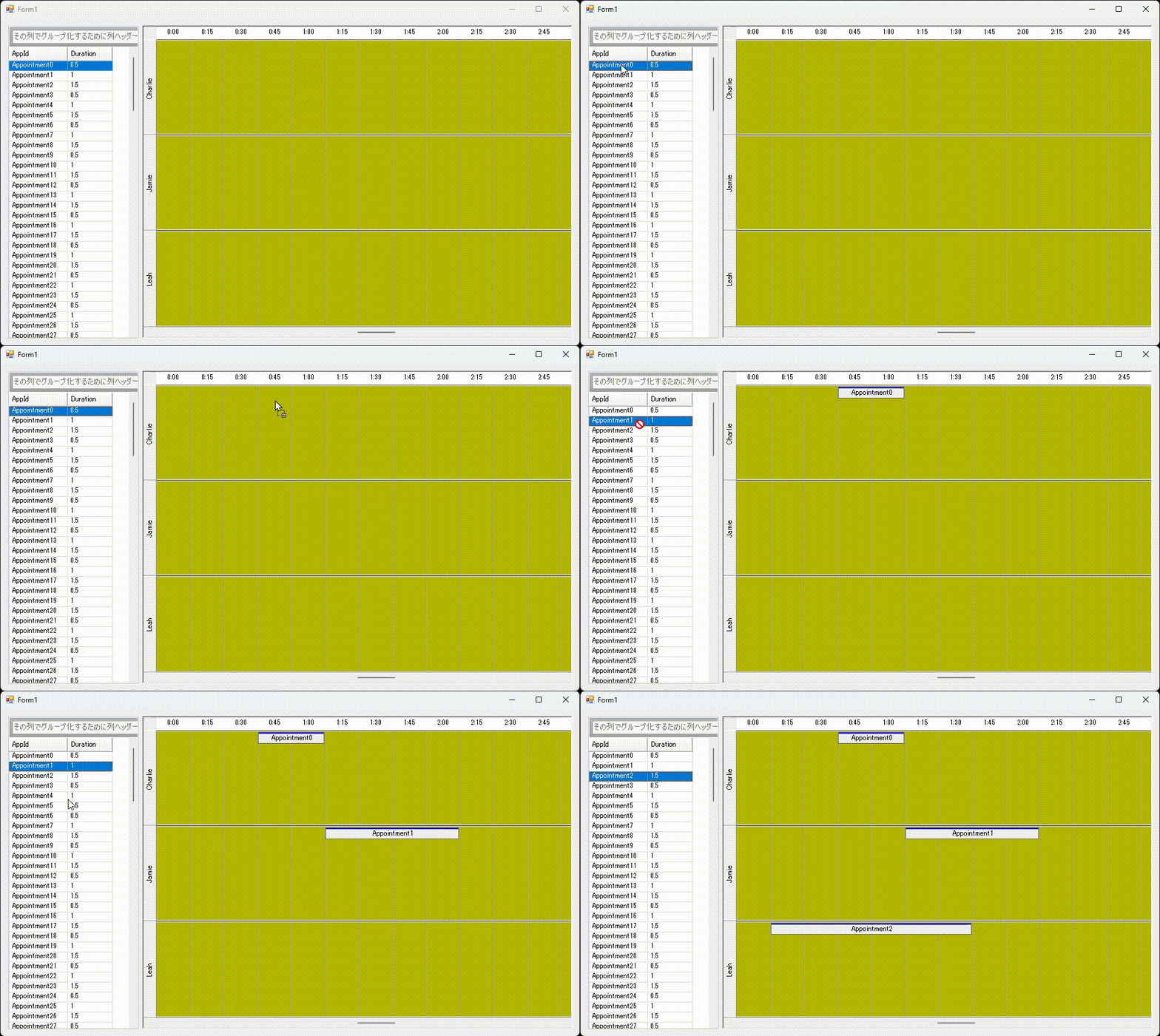
UltraGridの行をドラッグしてUltraTimelineViewにドロップし、予定を追加する方法をご紹介します。
まず、UltraGrid側ではSelectTypeRowプロパティをSingleに設定して単一行選択モードとし、CellClickActionプロパティをRowSelectに設定してセルクリック時の動作を行選択としておきます。
ultraGrid1.DisplayLayout.Override.SelectTypeRow = Infragistics.Win.UltraWinGrid.SelectType.Single;
ultraGrid1.DisplayLayout.Override.CellClickAction = CellClickAction.RowSelect;
UltraTimeLineViewではAllowDropプロパティをtrueとしてドロップ操作を有効とします。
ultraTimelineView1.AllowDrop = true;
UltraGridのSelectionDragイベントをハンドリングしてDoDragDrop()メソッドを実行し、UltraGridのドラッグを開始します。
private void ultraGrid1_SelectionDrag(object sender, CancelEventArgs e)
{
     // UltraGridのドラッグを開始する
     ultraGrid1.DoDragDrop(ultraGrid1.Selected.Rows, DragDropEffects.Copy | DragDropEffects.Move);
}
UltraTimeLineViewのDragEnterイベントではドラッグされているデータをみてe.EffectをCopyとします。
private void ultraTimelineView1_DragEnter(object sender, DragEventArgs e)
{
     if (e.Data.GetDataPresent(typeof(SelectedRowsCollection)))
     {
         e.Effect = DragDropEffects.Copy;
     }
     else
     {
         e.Effect = DragDropEffects.None;
     }
}
UltraTimeLineViewのDragDropイベントではドロップ位置から時間とオーナーを取得し、ドラッグされた行データからAppointmentインスタンスを作成して、UltraCalendarInfoのAppointmentsコレクションに追加します。
private void ultraTimelineView1_DragDrop(object sender, DragEventArgs e)
{
     //ドロップ位置の時間とオーナーを取得する
     Point point = ultraTimelineView1.PointToClient(new Point(e.X, e.Y));
     DateTime dt = (DateTime)ultraTimelineView1.DateTimeFromPoint(point);
     Owner owner = ultraTimelineView1.OwnerFromPoint(point);

     // 追加するAppointmentを作成する
     SelectedRowsCollection SelRows = (SelectedRowsCollection)e.Data.GetData(typeof(SelectedRowsCollection));
     Appointment app = new Appointment(dt, dt.AddHours((double)SelRows[0].Cells["Duration"].Value));
     app.Subject = SelRows[0].Cells["AppId"].Value.ToString();
     app.Owner = owner;

     // Appointmentを追加する
     ultraCalendarInfo1.Appointments.Add(app);
}