UltraGridでUltraTooltipManagerを使用する場合は、UltraGridのデフォルトのツールチップを無効にし、UltraGridのMouseEnterElementでUltraTooltipManagerの設定・表示、MouseLeaveElementでUltraTooltipManagerを非表示、にしてください。
例えば、マウスオーバーしたセルの値をツールチップに表示する場合は、次のようになります。
private void ultraGrid1_InitializeLayout(object sender, Infragistics.Win.UltraWinGrid.InitializeLayoutEventArgs e)
{
    // UltraGridのデフォルトのツールチップを無効にする。
    e.Layout.Override.TipStyleCell = TipStyle.Hide;
}

// UltraGridのMouseEnterElementでUltraTooltipManagerを設定・表示する。
private void ultraGrid1_MouseEnterElement(object sender, Infragistics.Win.UIElementEventArgs e)
{
    UltraGrid grid = sender as UltraGrid;

    if (e.Element is CellUIElement)
    {
        UltraGridCell MousedOverCell = ((CellUIElement)e.Element).Cell;

        UltraToolTipInfo info = new UltraToolTipInfo();
        info.ToolTipTextFormatted = String.Format(
            "<font face=\"{0}\">{1}</font>",
            "HGS創英角ポップ体",
            MousedOverCell.Value.ToString());

        ultraToolTipManager1.SetUltraToolTip(e.Element.Control, info);
        Point showPoint = Cursor.Position;
        ultraToolTipManager1.ShowToolTip(e.Element.Control, showPoint);
    }

}

// UltraGridのMouseLeaveElementでUltraTooltipManagerを非表示にする。
private void ultraGrid1_MouseLeaveElement(object sender, Infragistics.Win.UIElementEventArgs e)
{
    ultraToolTipManager1.HideToolTip();
}
実行結果
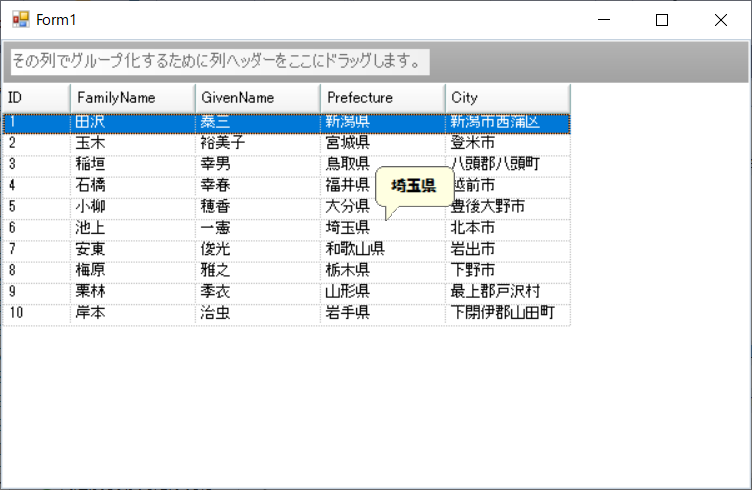
サンプル