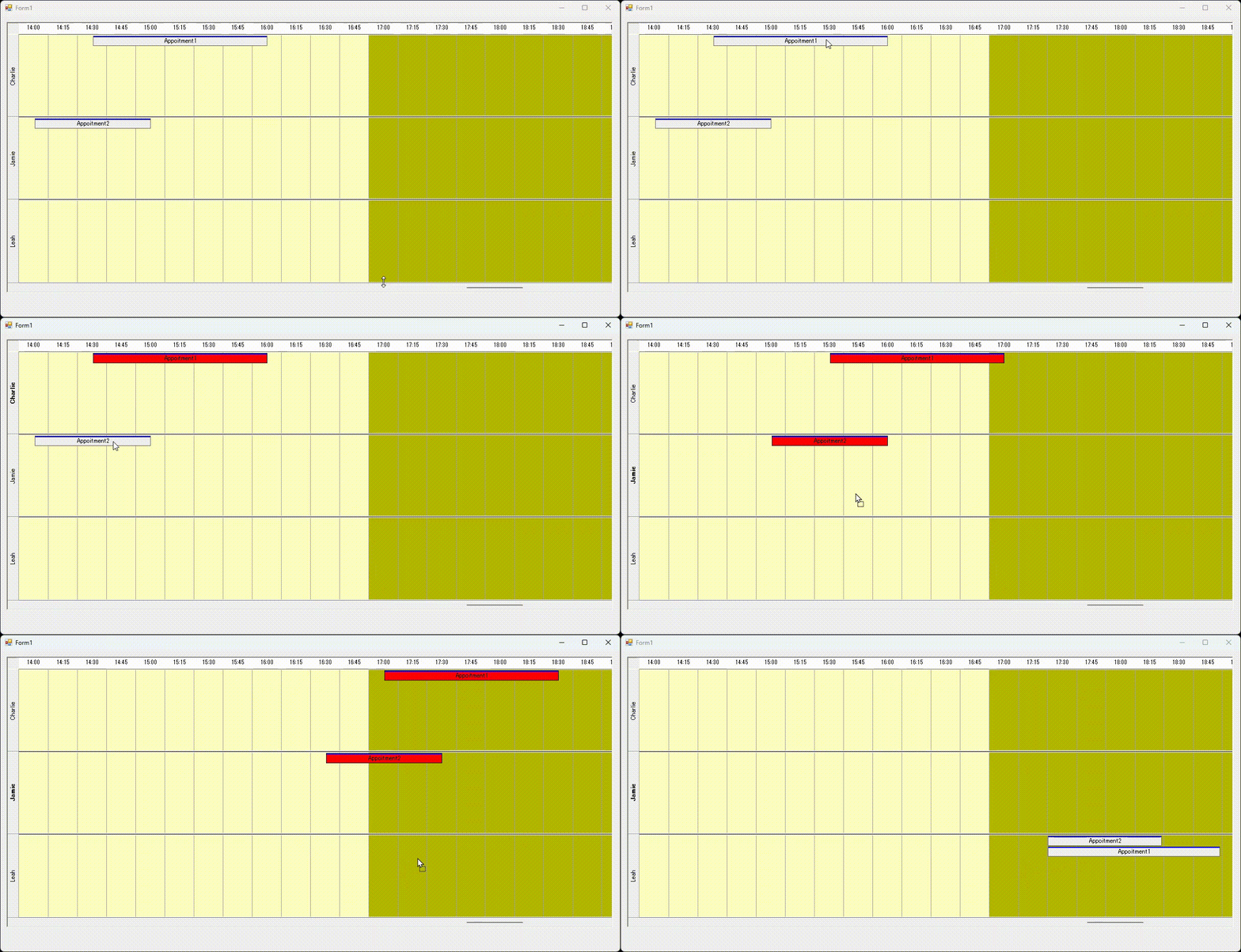
UltraTimelineView では選択した予定をドラッグ・ドロップ操作で移動することができます。しかし、規定の状態では複数のオーナーの予定を同時に選択することができないため、そのままではドラッグを行うことができません。
複数のオーナーの予定を同時にドラッグするには、UltraTimelineView の MouseDown イベントを使用して Appointment の選択状態をプログラムによって制御した上で、AppointmentsDragging イベントで既定のドラッグ操作をキャンセルして選択された Appointment を復元後、DoDragDrop() メソッドを実行してプログラムによってドラッグ操作を開始する方法があります。加えて DragEnter および DragDrop イベントでドラッグ・ドロップ処理を行います。
private void ultraTimelineView1_MouseDown(object sender, MouseEventArgs e)
{
	Point p = ultraTimelineView1.PointToClient(Cursor.Position);
	UIElement el = ultraTimelineView1.UIElement.ElementFromPoint(p);
	//Appointmentを選択する
	SelectAppointment(el);
}

private void SelectAppointment(UIElement element)
{
	if (element == null || element.Parent == null)
		return;

	if (element is Infragistics.Win.UltraWinSchedule.TimelineView.AppointmentUIElement)
	{
		if ((Control.ModifierKeys & (Keys.Shift | Keys.Control)) != 0)
		{
			((Infragistics.Win.UltraWinSchedule.TimelineView.AppointmentUIElement)element).Appointment.Selected = !((Infragistics.Win.UltraWinSchedule.TimelineView.AppointmentUIElement)element).Appointment.Selected;
		}
		else
		{
			((Infragistics.Win.UltraWinSchedule.TimelineView.AppointmentUIElement)element).Appointment.Selected = true;
		}
	}
	else
	{
		SelectAppointment(element.Parent);
	}
}

List<Appointment> selectedApps = new List<Appointment>();
private void ultraTimelineView1_MouseClick(object sender, MouseEventArgs e)
{
	selectedApps.Clear();
	//選択されたAppointmentを保存する
	foreach (Appointment app in ultraCalendarInfo1.SelectedAppointments)
	{
		selectedApps.Add(app);
	}
}

DateTime startDateTime;
private void ultraTimelineView1_AppointmentsDragging(object sender, AppointmentsDraggingEventArgs e)
{
	startDateTime = e.InitialDateTime;
	//規定のドラッグ操作をキャンセルする
	e.Cancel = true;
	ultraCalendarInfo1.SelectedAppointments.Clear();

	//選択されたAppointmentを復元する
	foreach (Appointment app in selectedApps)
	{
		ultraCalendarInfo1.SelectedAppointments.Add(app);
	}

	//ドラッグを実行する
	if (ultraCalendarInfo1.SelectedAppointments.Count > 0)
	{
		ultraTimelineView1.DoDragDrop(ultraCalendarInfo1.SelectedAppointments, DragDropEffects.Move);
	}
}

private void ultraTimelineView1_DragEnter(object sender, DragEventArgs e)
{
	if (e.Data.GetDataPresent(typeof(SelectedAppointmentsCollection)))
	{
		e.Effect = DragDropEffects.Move;
	}
	else
	{
		e.Effect = DragDropEffects.None;
	}
}

private void ultraTimelineView1_DragDrop(object sender, DragEventArgs e)
{
	//ドロップ位置の時間とオーナーを取得する
	Point point = ultraTimelineView1.PointToClient(new Point(e.X, e.Y));
	DateTime dt = (DateTime)ultraTimelineView1.DateTimeFromPoint(point);
	Owner owner = ultraTimelineView1.OwnerFromPoint(point);

	SelectedAppointmentsCollection selectedApps = (SelectedAppointmentsCollection)e.Data.GetData(typeof(SelectedAppointmentsCollection));
	ultraTimelineView1.SuspendLayout();

	//複数のAppointmentの場合
	if (isMultipleOwners(selectedApps))
	{
		foreach (Appointment app in selectedApps)
		{
			//追加するAppointmentを作成する
			Appointment newApp = new Appointment(dt, dt + app.Span);
			newApp.Subject = app.Subject;
			newApp.Owner = owner;
			//Appointmentを追加する
			ultraCalendarInfo1.Appointments.Add(newApp);
		}
	}
	//単一のAppointmentの場合
	else
	{
		foreach (Appointment app in selectedApps)
		{
			//追加するAppointmentを作成する
			Appointment newApp = new Appointment(app.StartDateTime, app.EndDateTime);
			newApp.Subject = app.Subject;
			newApp.Owner = owner;
			//Appointmentを追加する
			ultraCalendarInfo1.Appointments.Add(newApp);
		}
	}


	//もとのAppointmentを削除する
	for (int i = selectedApps.Count - 1; i >= 0; i--)
	{
		ultraCalendarInfo1.Appointments.Remove(selectedApps[i]);
	}
	ultraTimelineView1.ResumeLayout();
}
また、ドラッグ中の Appointment 要素をマウスの動きに合わせて移動させるため、DragOver イベントの実装を追加し、ドラッグ中の Appointment の StartDateTime と EndDateTime を調整します。
DateTime? lastDt = null;
private void ultraTimelineView1_DragOver(object sender, DragEventArgs e)
{
	Point point = ultraTimelineView1.PointToClient(new Point(e.X, e.Y));
	DateTime dt = (DateTime)ultraTimelineView1.DateTimeFromPoint(point);
	Owner owner = ultraTimelineView1.OwnerFromPoint(point);

	SelectedAppointmentsCollection selectedApps = (SelectedAppointmentsCollection)e.Data.GetData(typeof(SelectedAppointmentsCollection));

	if (dt != lastDt)
	{
		//マウスの移動に合わせてAppointmentの位置を移動する
		TimeSpan duration = startDateTime - dt;
		foreach (Appointment app in selectedApps)
		{
			app.StartDateTime -= duration;
			app.EndDateTime -= duration;
		}
		startDateTime = dt;
		lastDt = new DateTime(dt.Ticks);
	}

	//単一のAppointmentの場合はOwnerを変更する
	if (!isMultipleOwners(selectedApps))
	{
		foreach (Appointment app in selectedApps)
		{
		   app.Owner = owner;
		}
	}
}

private bool isMultipleOwners(SelectedAppointmentsCollection apps)
{
	Owner thisOwner = null;
	foreach (Appointment app in selectedApps)
	{
		if (thisOwner == null)
		{
			thisOwner = app.Owner;
		}
		else
		{
			if (thisOwner != app.Owner)
			{
				return true;
			}
		}
	}
	return false;
}
以上の実装により、Appointment を Ctrl または Shift キーでクリックしてドラッグ対象の Appointmentを選択後、それらのいずれかの Appointment をもう一度マウスダウンし、そのままドラッグで移動することができます。